Effectively, by this tutorial, we will be disabling logins on the ubuntu box, and just using gdm and the x-server to talk to a server on the local network using XDMCP. This means, that you’ll actually login to the remote server, and use the remote servers’ data and processing power.
WARNING: This will disable GUI access to your computer!
DON'T do this to a machine which you want to use without having to
play around with the X configuration files in command line.
In ubuntu, you can switch all logins to XDMCP quite simply. Here is the Howto:
- Click on System > Administration > Login Window
- Enter your password (if requested)
- Click on the security tab
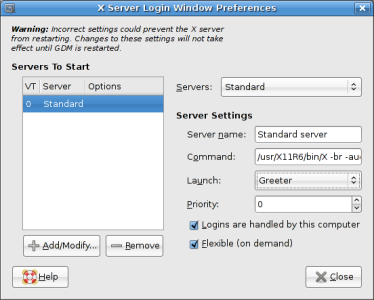
- Click on the “Configure X Server” button in the bottom right hand corner of the window. This pops up:
- Change the “Launch” value from “Greeter” to “Chooser”
- Click close twice, and log off
- Hit CTRL – ALT – BACKSPACE together, to restart GDM. You should now have a XDMCP host searching window, which will locate any computers which have had XDMCP logins activated. If you want a howto for setting up a server for that, please comment!