Hi all, I was having trouble installing Mythubuntu 12.04 on an old PC I had lying around.
Mythubuntu is based on Ubuntu 12.04 so if you’re struggling with the ATI Radeon 9200 on there these steps should help.
(Since I have a Hauppuage Nova-T 500 dual freeview pci card from old projects, and a 2tb drive from new ones, I wanted to see about recording some films!)
Basically, when booting it would come up with a garbled, black or blank screen.
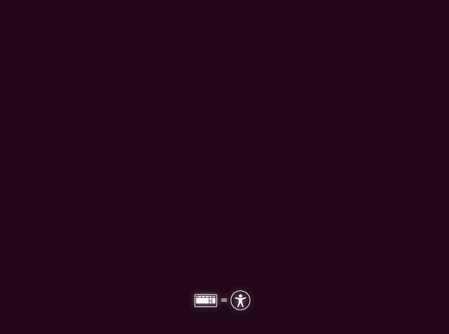
If this happens during the livecd boot, preventing you from installing, when you see the logo:

Logo that appears when first booting ubuntu from livecd.
Hit enter, and F6 for other options, select nomodeset, hit enter to enable then Escape and enter to boot.
If operating from a laptop, you might want to try noapic too.
In the latest grub setup – grub 2 – the boot menu is hidden, making it near impossible to access.
Might make it look pretty but is major frustrating for troubleshooting!
The script /boot/grub/grub.cfg it uses is supposed to boot in textmode if it has failed to boot, but this does not work.
The fix:
Note: you can login, type
sudo su
and then skip typing sudo with every command below (it gets quite annoying I know!)
- To access the grub bootmenu, hold down shift – after all your pc’s bios and add-on cards bios screens have disappeared and until it pops up – it takes a while to appear!
- To access the console – textmode, insert the word text and remove ‘splash quiet’ from the kernel options,
also insert the word nomodeset
then press F10 or Ctrl-C to boot with the new settings.
- Connect to the internet, if using Wired connection you may need to connect (hopefully you connected ok during the install)
sudo nmcli -p con up id “Wired connection 1”
If that doesn’t work check your wireless connections names with and edit the above command appropriately
nmcli con
- Install xserver-xorg-video-ati
sudo apt-get install xserver-xorg-video-ati
(don’t freak out when you see ‘Removing Mythubuntu-desktop’ it seems to come right in the end.
- Create a new link for the X server
(Not sure why this breaks after the upgrade but it won’t work without this step!!)
sudo ln /usr/bin/Xorg /usr/bin/X
- Edit the default bootmenu script
Add nomodeset to the default grub bootmenu
sudo nano /etc/default/grub.cfg
Change this line near the top:
GRUB_CMDLINE_LINUX_DEFAULT=”quiet splash”
to
GRUB_CMDLINE_LINUX_DEFAULT=”nomodeset”
#”quiet splash”
The # tells it to ignore this bit, it’s a backup so that we can make it quiet again later. You’ll notice text streaming by as the system boots instead of the cute (Myth) Ubuntu …. logo
Ctrl-X to exit, type s and Return to save
- Update grub
sudo update-grub
- Reboot and Revel in the shinyness
sudo reboot
I actually ran this command to to start the windows manager, (and I haven’t tried rebooting yet, shhh)
sudo start lightdm
If you have any extra trouble, comment below, check the ubuntu forums and google.
I managed to work this out on my own as I couldn’t find the answer!
I also created a script to set the resolution of lightdm at boot, following the guide here:
LightDM Resolution
This did not work as when I started lightdm, the resolution was set higher than I’d set in lightdm, so I don’t think this was part of the fix.
Thankfully it was within my monitors capabilities. I think I set the output name wrong.
I need to figure out the display outputs are available but couldn’t query it from the command line without x running, which seems kinda silly.
Hope this has been helpful!