MindDump. Photos. And random ramblings.

+menu -


  • Tag Archives computers
  • Prevent Adobe Acrobat Crashing Firefox

    I’m using Adobe Acrobat (for compatibilities sake only, please post your favourite PDF program in the comments below!), but I’ve been rather annoyed recently at it having a tendency to hang Firefox if I tried to open more than one PDF file from the internet.

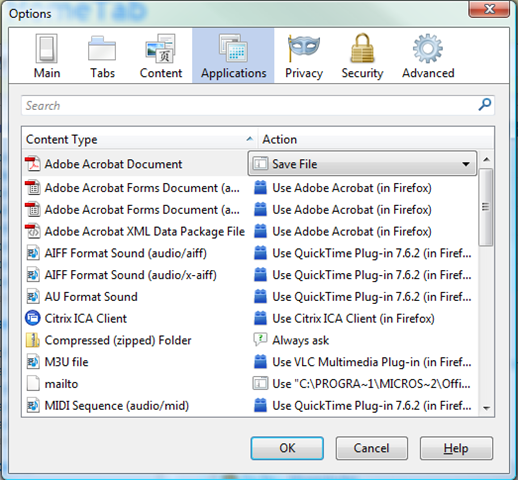
    Simple fix/hack – make Firefox save PDF files rather than open them.

    1. Open Options (Tools \ Options in Windows and Edit \ Preferences in Linux)
    2. Open the Applications tab
    3. under ‘Adobe Acrobat Document’ change the value of the dropdown to ‘Save file’

    Firefox Applications options tab. Vista I know!

    1. OK the change
    2. All done. Hopefully that’s one less annoying crash to worry about!

    Ps get Session manager to save yourself loosing a window full of tabs or having to do a horribly manual procedure like recovering tabs from a accidentally closed Firefox window.


  • Help firefox wget and ssh shell script

    I’m trying to create a script to allow me to command a remote server to download a file from firefox.

    There are various reasons for this, mainly todo with connection speed.

    What I have at the moment is:
    #/bin/sh
    terminator -x ssh user@site.com wget -qc -t 3 -o ~/wget_testlog ftp://anothersite.com/file.ext \\& \& &

    I want it to kick off, ask for a password to login via ssh and then go away…
    I would like to be able to set the location for the download to ~/www/files/

    I was planning to place this script in /usr/bin and install it in firefox using the code/link provided on this blog: Wget from firefox

    Can anyone complete my solution with the correct syntax, or provide a better solution (preferably KISS)?
    I’m more of hacker than an expert IMO and I know when I’m out of my depth!

    Cheers,
    Garreth


  • People are strange

    We have a lot of customers. A few, whilst emailing us at tech-support can be rude. It’s interesting, visiting their sites, and seeing whether that is just because they’re stressed, under the effects of caffeine, or are just naturally rude.

    Take one example… one person just kept ignoring what I said, treating it as if I didn’t know what I was writing about. Turns out, I did, and I fixed the immediate problem (if not the whole one, but that’s something different altogether). He still insists on treating me as if I’m not worth listening to.

    Surprise surprise, if I am given the choice (and at the end of the day, when I’m just doing support tickets to stop them needing to be done tomorrow, I often am,) I will delay answering the tickets of those who have been rude. They’ll get done at some point, but I won’t prioritize them; what’s the point? I’d rather help someone who will be grateful! I will go all out in my own time on a problem that interests me, or a customer who is kind. I will go all out if you are rude, but you are stressed and have an excuse. I may force myself to go all out if you pay us a lot of money (but it won’t be on my own time ;) )

    I’ve stayed in the office till 10pm, on a ‘I’m not getting paid right now’ problem, because it interested me, and I liked the people running the website involved. I will gladly spend my free time trying to help them.

    If you talk to tech support, be nice! Say thank you, treat us with respect, and you’ll find we’ll be inclined to help you a lot more. Ignore what we say, treat us rudely or as if we don’t know what we’re talking about, and we’ll get dispirited. The last thing you want is dispirited sysadmins. They tend to go home on the dot, and they won’t go out of their way to help you.

    If you’re angry, worried, stressed, take a deep breath and a calming moment before speaking to us. We, like anyone else, don’t like people shouting at us for something we can’t help. If your website goes down, because the server it’s on has blown up, and you didn’t pay for a fail-over system, we can’t help you any faster by you shouting at us, and you shouting at us will not make us like you ;)

    In the end, just remember, we’re human too! That person you call up because your email is broken has emotions, and they’re likely busy fixing problems, or helping others already. Don’t let the frustration of the problem blow into anger at the people who try to fix it for you :)


  • The effects of sleep deprivation

    Or what happens when you have to stay up for 22 hours, because a server has suddenly decided it doesn’t like life, and would rather die, as I had to this morning.

    Managed to recover it in the end, but this would be the downside of my job ;)

    Weak, managed to strain my legs, so both were aching, but oh, did bed feel nice when I got to crawling in!

    In my case, sleep deprivation results in:

    1. getting sillier
    2. getting grumpy
    3. trouble accessing memories
    4. eye-hand co-ordination beginning to degrade

    I guess, that over time, you can train yourself to deal with these sort of symptoms (though for me, being silly is a bit strange :) )


  • Fail.

    Example one – forgetful screenshots

    screenshot-fail

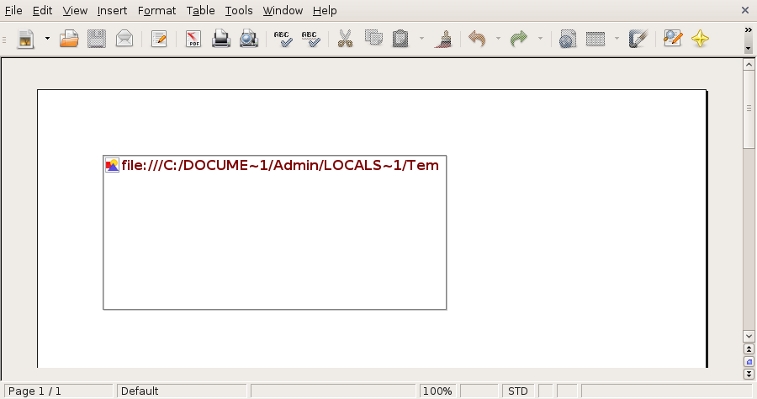
    A couple of screenshots. Firstly, every now and then, people send us screenshots. They do this by sending them in word documents, which is bad enough. (Please, just send us an image file!) This example though, is quite fun.

    Make sure you actually copy the screenshot in, instead of just linking it ;)

    Example 2 – Infect yourself, and pay money for the privilege

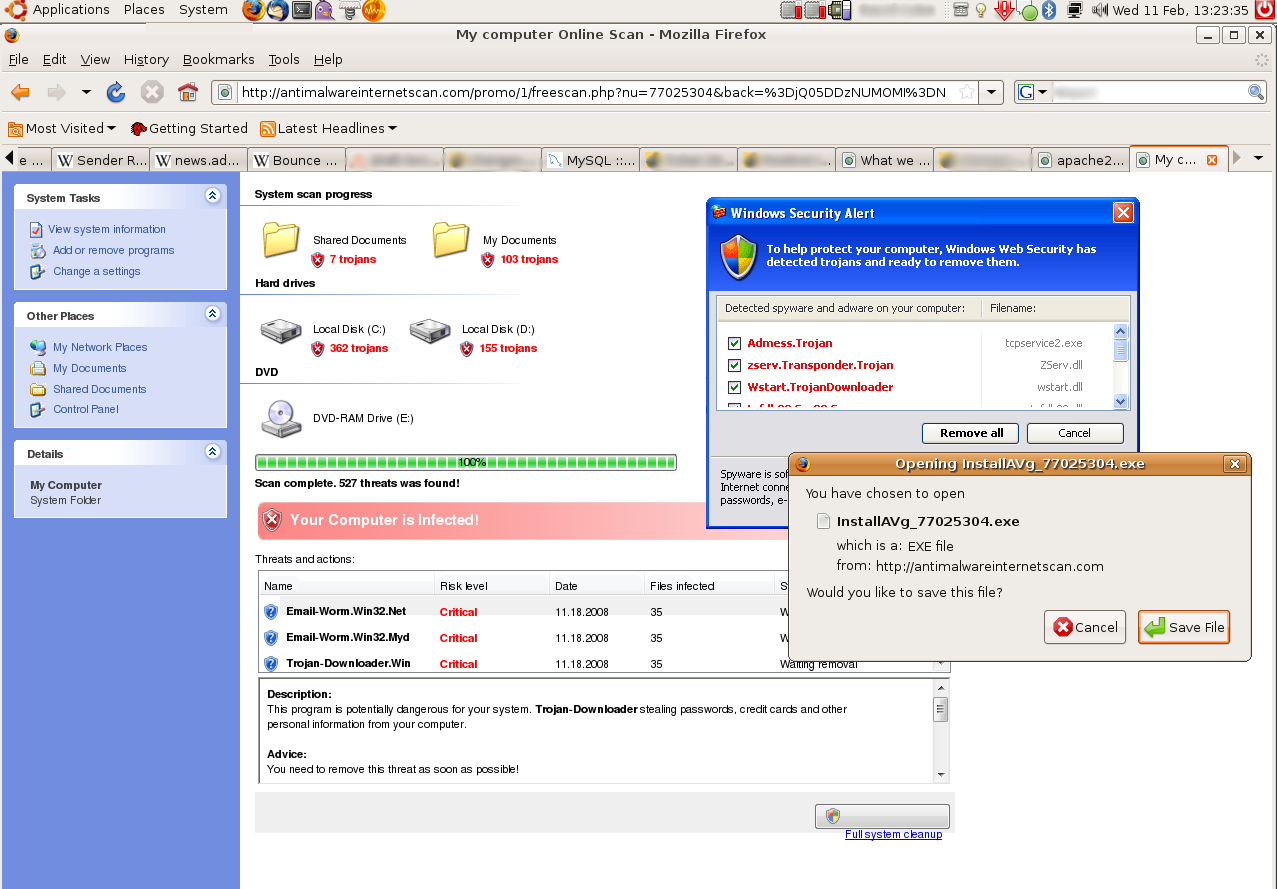
    Stupid-Script-Kiddies

    My second example, is of a website trying to extort money, by making you think your computer has been infected with a virus. These are nasty sites, and I hate them with a passion. They feed off of people’s fear of computers. The interesting thing here is, this computer can’t be infected in this way… it’s running ubuntu, their silly antivirus software looks very, very out-of-place!

    (See my first post this month if you’re afraid of computers.)

    Click on the image for the full screenshot. It is quite large. As you can see from the timestamp, I’ve been meaning to post this one for a while ;)

    p.s. Does anyone know how to force formatting in wordpress? This post took about 10 minutes of fiddling to get the images to go some-where near where I wanted them :/ If you do, please comment! If you don’t please comment. In fact, please comment, comments make my day!


  • Day 1: NaBloPoMo

    What a strange name for an event. Anyway, yes, this is my second attempt at the interesting experiment, of posting once a day, every day during this month.1 I expect quite a few of these posts will be small, random and useless. Sorry about that, just to warn you!

    Anyway, onto more interesting things. Book review :)

    Completed the “The Business” By Iain Banks the other week. Good book, though not one of his best… Gripping read from about ~60-70% of the way through. Predictable up to that point.
    All about a large, democratic company, and the machinations and politics within it, as it looks to buy a small country, to attain a seat on the UN council.

    Interesting and enjoyable enough read, but not spectacular by any stretch. I’ll not keep it for my book collection :)

    Some other thoughts I had whilst talking to someone at church today… Working with the people I do, it’s easy to forget the fear and lack of knowledge a lot people have with computers. For me, they’re simple, far easier to understand than a human by any stretch of the imagination!

    If you are ever afraid of a computer, the best thing you can do is to make a backup of all your files onto a USB stick, and then just play with your computer. Don’t be afraid of breaking anything, let your fear go. Just explore all the menus, options and settings, see what happens when you change things around. Right click on everything!


  • Current Cost – watt hours and pachube

    This is an email i sent to JT  so I apologise if it doesn’t make sense to y’all. Please ask questions if you don’t get me!

    So we have this ‘Current Cost’ meter thing (free from Southern Electric) at the house. It’s a small wireless electricity meter. Well it’s more of a monitor or display actually but you get me….[insert pic].

    Long story short, I’d noticed the RJ45 on the bottom and it’d got me wondering. A few google searches later and whammo i’d found what I needed. A bit of hardware, a bit of software (links on manyfacturers website!) and whammo….

    I wired up the current cost (enegry meter) at the house to my laptop and it’s uploading to this Pachube (bless you) website:
    http://www.pachube.com/feeds/2196

    The graph is a bit useless atm (no history or dates on it :( ) but the program here:
    http://apps.pachube.com/google_viz/
    Could probs snazz it up a bit.
    There seems to be a binary pattern from some device that is turning on and off at regular intervals and using ~100w… i wonder if it’s the compressor on the fridge/freezer as it goes on thru the night lol.

    Graph of peak watts and temperature from current cost and excel
    Graph of peak watts and temperature from current cost and excel

    The long jittery spikes are the washing machine/dishwasher/tumble dryer (the last being the biggest draw lol).

    One guy is even trying to record signatures for each appliance and then work out from the data which appliance is causing the spikes.
    http://chrishodgins.tumblr.com/post/33810511/via-chart-apis-google-com-so-its-the-bank
    The idea behind this is if you can work that out, you can make a pie chart of the biggest consumers…

    I have more results than are uploaded; i created a funky excel file which Should update from the mdb created from one of the apps i’m using but atm i think the file is locked or summat :( . Made a pretty graph to! Also predicting the future temperature based on a polynominal curve or something lol.

    All gd fun. Now i jus want one of these tiny minuture computers:
    http://www.fit-pc.co.uk/fit-pc-slim.html
    or this awesome plug pc:
    http://www.pcpro.co.uk/news/258238/plug-sized-pcs-arrive-in-uk.html (sweet) (Ubuntu on a plug [ via Youtube])
    to record/upload the results, although it would make more sense to use the ipcop or home server since they are always on and the current cost device is wireless. (unfortunately our model does not have internal data logging :( ). Don’t know how to work out kwh from current usage of watts every 3 seconds… i might be able to put something from averages tho. Any suggestions  anyone? I might just be being dumb lol.

    Now all we need is the x10 plug thru devices to monitor electricty usage (by appliance) and bobs your uncle – we know exactly where the electricity is going.

    IMO  (as a soon to be Building services engineer in training) this technology should be wired into all new houses in the actuall plug sockets. Want to know which of your kids (or indeed partner) is using the most electricity? ;)

    The trickle usage these measuring devices could be designed to run on could easily be offset by a small(ish) solar pv installation too! (i’m talking around 10-30wh/day here ;) ).

    Oh and here’s how to connect the current cost to pachube:

    http://community.pachube.com/?q=node/100

    On the upside i’ve also unplugged the fancy pants MPPT  solar charge controller and hooked the install back up to the basic on/off controller, and now it’s definetly shifting amps! I was a bit worried that in full sun 53watts of panels was ONLY putting through 0.3-0.1a @11.7 (i know, discharged). Hmm gonna have to find out whats wrong with fancy pants, he wasn’t cheap! :’(


  • Day 5 – Datacentre work

    Today, I was planning on scanning through NaBlogPoMo’s blogroll and pick out a couple of good ones. However, life always likes to intervene, and at about 1730 a server decided to fail. Wouldn’t boot up, nothing on the console.

    As I’m on call this week, it was my turn to head into the datacentre, to have a look and try to fix it. For some reason, whilst it was showing network lights (so the network card was obviously initialized), it wouldn’t show anything, nor would it respond at all to server commands. I was planning to switch the hard-drives into a spare server, but a colleague of mine called to say that I should first reset the BIOS. (Take the battery out, short the contacts).

    In the end, doing that cleared the problem, and the server came back online OK. A little confused – it thought it was 1400, rather than 2100, but apart from that it was fine.

    I’ve only ever seen that trick work once before, on an old desktop machine. Still, that’s a good thing to try – if the BIOS confuses itself into oblivion, you can reset it by taking the battery out and shorting the contacts. (With a screwdriver is normally easiest – you’ll probably just have used it to open the case.)

    Another hardware trick I often use, I’m not sure how relevant this will be if you’re not in the UK – Plug the computer you’re going to work on into a power socket, but make sure the socket is off at the switch. The earth pin is never disconnected – the switch will only ever interrupt the power flow, not the earth. So, if you’re not sure about static electricity in your environment, its a good way of making sure you’re clean – as the earth will be connected to the computer’s case via the PSU :)

    A quick spelling / grammar question to those reading – is “online” a valid word, or should it be written “on-line”? I’m never certain, but my spell checker seems to think that it should be “on-line”…


  • General Update Ramble

    The following is a random update, covering everything from my explorations of Linux to life stuff. Feel free to skip if you don’t care :)

    Hardy Release Party

    Was really nice, once I’d got past my initial reluctance to go and the butterflies in my stomach as I traveled to it. I said on IRC before I left, that the first person to recognise me, would get a drink on me. Daviey failed, he was outside having a cigarette when I finally arrived. To be fair, he wasn’t on the IRC channel when I said about the free drink… I managed to get lost, walking from the tube (Embankment) on the way to the pub – asked directions three times. Had the obligatory chat with Daviey about asterisk (I like asterisk!) and some of the pros and cons of the FreePBX interface add-on. (As suggested by Popey on the mailing list. Thanks!)

    I went in with Daviey, and saw Alan Pope. He was in the middle of a conversation, but was about to say “hello Kirrus” to get his free drink, when Josh (Jerichokb) popped up, and nabbed it first :) . Funnily enough, we had this conversation on IRC before I left:

    <jerichokb>    Kirrus: thank you in advance for the beer :) 
    <Kirrus>       jerichokb, don't count your chickens...
    

    Heh… I guess he can count them after all :)

    I had a really nice time, which is *really* unusual for me in a room with that many people in it. (I don’t do lots of people… I normally can’t cope, and leave asap, or sit in a corner hiding…). Sad to leave at 9, but I got lost 4 times(!) on my way back to the tube station, (asking for directions each time… one guy gave me dogy ones…).  Next time I find a good map. Missed the train I was aiming for, and ended up taking the last train, got home midnight. (Yes, three hours travel. Missing the train will do that for you.)

    Distro Experimentation / Hard Drive Failure

    Well, my CentOS install died with my harddrive, about 2 days after my posting about it. CentOS is useable, and is quite nice, though I didn’t reinstall it when my new drive arrived. Unfortionatly, it turns out that my new drive has some bad blocks on it. Repaired the filesystem using “e2fsck -c” on the live cd, and reinstalled gutsy. Upgraded to Hardy RC. A lot of work. I’m going to have to boot back into the LiveCD sometime and check the filesystem again, to see if there’s any more corruption. If so, I’m going to have to get another Harddrive, and RMA this one. Just what I didn’t need with my dwindling savings and no job. Update:(Thanks, as always, to the Ubuntu-UK irc guys for the help and advise as I tried to repair my partitions)

    Jobs

    I’ve had 2 interviews so far, one at Codian, one at Canonical. I’d  really like to get the Canonical one (working in a datacentre, looking after servers), as it sounds like an enjoyable thing to do, that and giving me plenty to learn. But, I don’t think I will. (Heh – my natural state after any interview. Then getting the job is a pleasent surprise rather than a disappointment.) Millbank tower is NICE, and the commute into Vauxhall fairly simple.. I just take a slow train from a town about 3 and a half miles away… an hours walk, or 15/30 minutes cycle depending on the traffic, and which way you’re going. (To is easier. One big hill up, then mostly downhill to the station.) I’m still awaiting a reply from Canonical HR about blogging guidelines as applied to interviewees, so I won’t go into too much detail about that interview here. Suffice to say, it was interesting.
    The Codian interview was by far the most difficult, I was asked a tonn of questions by three different people, over 2 hours. Decimal to binary (on a whiteboard).. I’m a bit rusty at, not having done it much before, but got there in the eventual end. Decimal to Hexadecimal, mathmatics is not my strong point, but again, got there in the end. (6E == 110).Very friendly receptionist :)

    I’ve one interview/meeting left, at Positive Internet. Sounds interesting…

    If you know of any Junior/Trainee Linux/Ubuntu-Based jobs in London going around, let me know.

    To Do:

    • Process, upload and blog photos. Recharge camera’s battery (rarely need to do!)
    • Continue Job Hunting.
    • Look at the feasibility of moving onto a new blogging platform, but staying with my current email and domain host.
    • Hunt for jobs.
    • Bug Triage.
    • Think about applying for temp work to tide me over.

  • Useful Ubuntu Things to Remember

    • To open a terminal in Ubuntu, go to Applications > Accessories > Terminal
    • To add shortcuts from the applications listing to your desktop or top/bottom panel, browse to the location of the program under applications, click on it DON’T LET GO, and drag it to the bar at the top, or onto you desktop. Let go.
    • To run a unattended upgrade on an (K/X/U)buntu machine use the following command in a terminal:
    apt-get update; apt-get upgrade -y
    • If you only want the upgrades to be downloaded, and not installed as well, then use this one (I think, this hasn’t been tested, and you could probably do it a bit more neatly with -dy):
    apt-get update; apt-get upgrade -d -y
    • Most linux variants store their programs (e.g. lspci) under /usr/sbin
    • To force evolution (linux version of MS Outlook) to close completely, open a terminal, and run the following command:
    evolution --force-shutdown